

Max Ultra MCP: AI agents and automation for 3ds Max



From talking to AI to taking action in 3ds Max
You send AI an apartment floor plan and ask it to build the walls, floor, and openings. A little later, geometry appears in your open 3ds Max session. The agent takes a screenshot, looks at the result, and keeps working. Meanwhile, you can select a wall, change its height, or adjust a window's position using the program's usual tools.
We're already used to AI generating text, images, and code. But I'm much more interested in what happens when it can put its knowledge to work in the program I use every day. Create an object, change a material, set up a camera, run a script, and figure out why it isn't working.
That's exactly why I created Max Ultra MCP. It started with wanting to spend less time manually checking my own scripts. It ended up becoming a tool for experimenting with modeling, architectural visualization, and everyday scene work.
What Max Ultra MCP is and how it works
MCP stands for Model Context Protocol. Put simply, it's a way to connect an AI agent to another program's tools. Imagine a bridge: on one side, an agent that understands your request; on the other, 3ds Max with its objects, materials, and cameras.
Max Ultra MCP gives the agent access to operations in an open 3ds Max session. You launch the program and the tool, connect a compatible AI client, and describe what you want to do. The agent gets information about the scene, takes action, checks the result, and tries to fix it if necessary.
Max Ultra MCP itself is not artificial intelligence. The connected agent makes the decisions. How well it understands the task, chooses tools, and spots its own mistakes depends on that agent.
Many operations don't require hunting for buttons on the screen. The agent can request a list of objects directly or call a tool for working with layers. When a built-in operation isn't enough, it can write and run MaxScript. And to judge how things look, it can use screenshots of the viewport.
This approach cuts down on intermediate steps. But I wouldn't promise that every task will happen instantly: analysis, code generation, and checking take time too. Besides, access to MaxScript doesn't mean the agent knows the quirks of every installed plugin.
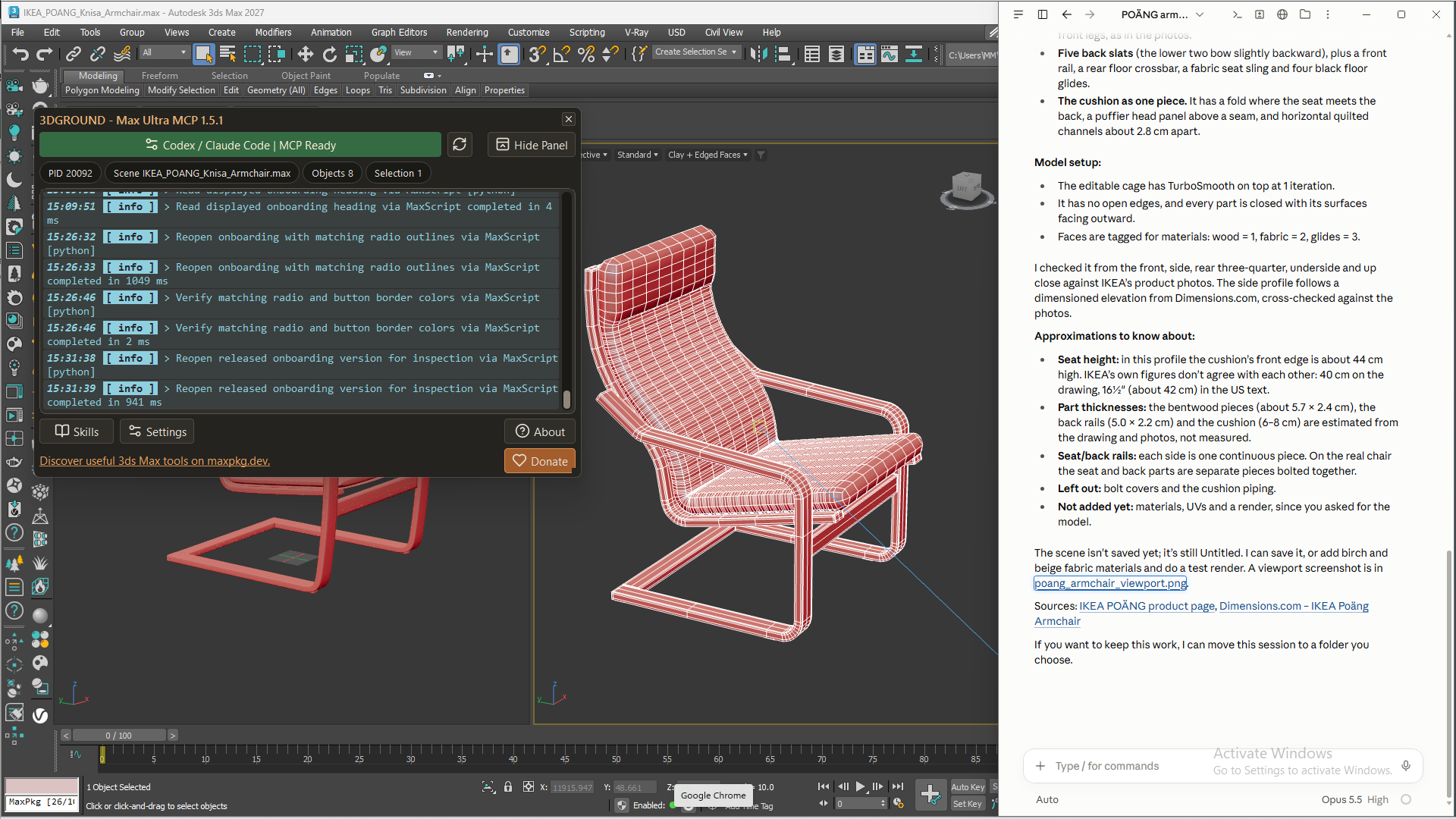
Why I decided to create Max Ultra MCP
Sometimes changing the color of a single button cost me fifteen minutes of work. The edit itself was quick. Then I had to open the tool in 3ds Max, check the window at different sizes and in different states, find another problem, fix it, and start all over again. Tiny button, full-sized adventure.
That was part of my work on MaxPkg Manager. It brings together a web interface, JavaScript, PowerShell, and MaxScript. All of it needs to work together, not just look good in the source code.
AI was already helping me write code, but I was still the one testing it. Copy the script, run it, get an error, send it to the chat, wait for a fix. If the problem was visual, I also had to explain which button was cut off and at what window width. The agent wrote the code, and I was acting as its eyes and hands.
That was the loop I wanted to automate. I already had subscriptions to AI services, and I wanted their agents to be able to run code in 3ds Max, receive errors, and see the results of their work.
That's how Max Ultra MCP started. I find it especially useful when developing Python and Qt interfaces: I can discuss a specific window in the running program and check the next change right away. Later, it became clear that developers weren't the only people who needed the ability to read a scene, run commands, and look at the result.
What AI can actually do in 3ds Max
The most useful tasks usually have clear conditions and a result you can check. So I'd start with whatever has been annoying you for ages: repetitive edits, renaming, camera preparation, or yet another small tool you never get around to writing.
Below, you'll find examples from my work along with prompt ideas for your own experiments. These are starting points: the result depends on the scene, the model, and the available tools.
Creating and editing 3D objects
The agent can create geometry, move, rotate, and scale objects, and work with splines and modifiers. You can ask it to build an object from scratch or modify an existing one. Objects with a clear construction make good first experiments: a table, shelving unit, cabinet, or simple chest of drawers.
For example, this prompt sets fairly specific requirements:
Create a shelving unit 120 cm wide, 200 cm high, and 35 cm deep. Use 18 mm thick panels. Add four evenly spaced internal shelves. Keep the sides, top, bottom, and shelves as separate objects with clear names. Check the overall dimensions and show front and perspective views.
If you have a photo, you can ask the agent to analyze the construction before it starts modeling. That's more useful than expecting an exact match after simply saying "make it".
Study the photo of the cabinet. Its overall width is 160 cm. First, describe the main parts and proportions, and label any dimensions that aren't visible as assumptions. Create the basic geometry without small decorative details and show it next to the reference before adding detail.
You can refine an existing object too: change the tabletop thickness, shelf spacing, or number of repeated parts. Here, it's worth saying up front what should stay the same. The overall width, material, or position relative to the floor, for example.
Sometimes a very simple model is enough for the background. If an object is only seen from one angle and most of its appearance comes from a texture, you can ask the agent to choose geometry for that particular shot. The requirements for this kind of asset will be very different from those for furniture in a close-up.
Creating architecture from drawings
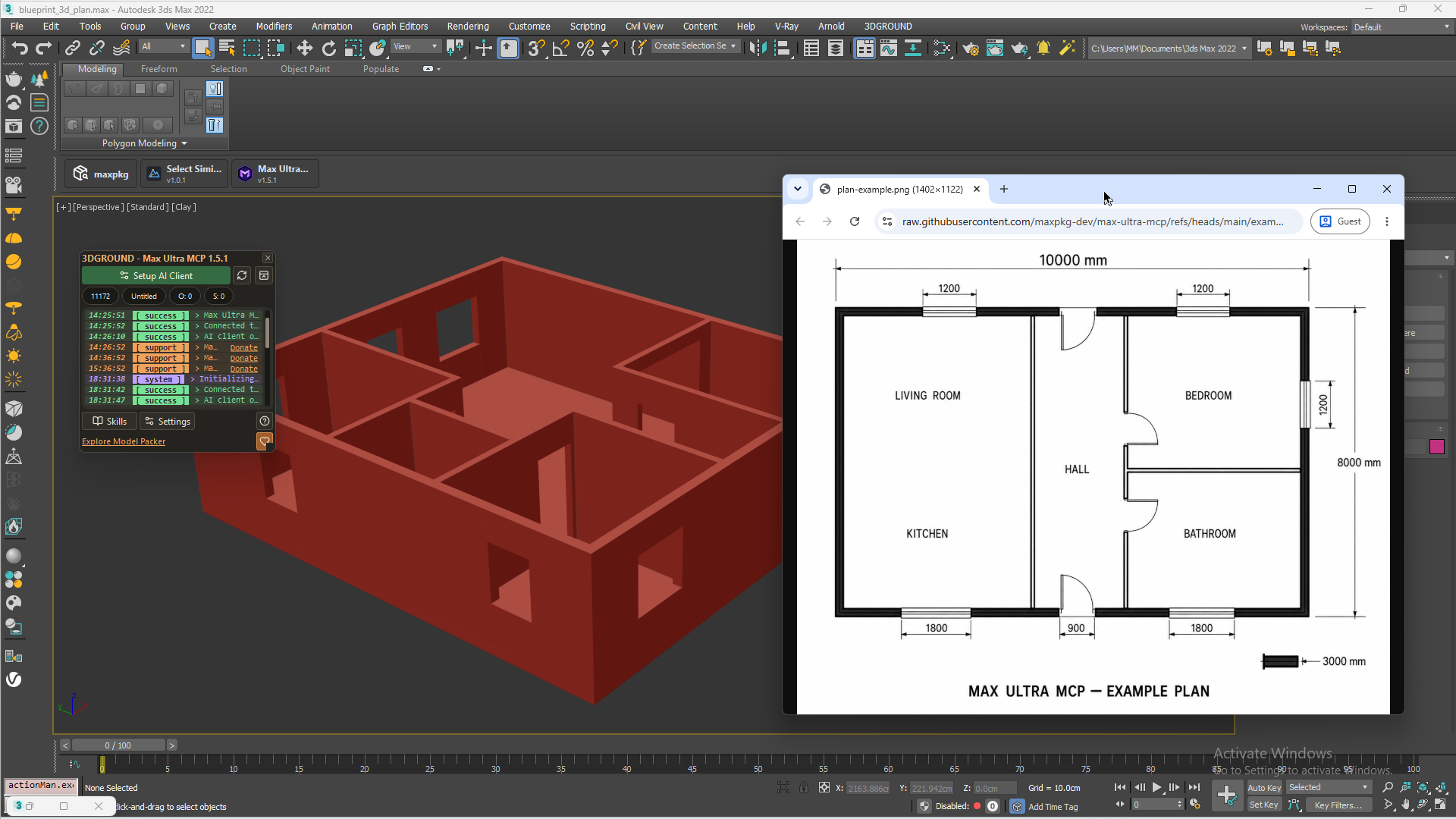
A floor plan is a good example of why an agent needs both an image and access to the scene. First, it has to understand the drawing: read the dimensions and identify the walls, doors, and windows. Then it has to turn that information into geometry and check the result.
Max Ultra MCP includes a workflow for building a floor plan from a dimensioned image. AI analyzes the image, so the quality of the source matters. If a dimension is unreadable or the plan has no scale at all, the agent will have to ask for clarification or make assumptions. It's better to sort that out before the walls appear. A floor plan example in the documentation.
Use the attached plan to create the basic room geometry: walls, floor, and door and window openings. Use centimeters and a wall height of 280 cm. First, list the dimensions you can read and ask about any that are missing. Once agreed, build the geometry, keep the original wall spline, and show top and perspective views. After checking the openings, add doors and windows as separate simple objects.
I've already tried creating a 3D house plan from an image, and different agents were able to complete the task. But having walls doesn't prove that the model is accurate. You need to check thicknesses, joints, room dimensions, and opening positions. This is a starting point for further work, not automatically finished construction documentation.
Materials, cameras, and rendering
Here, I'm mostly interested in specific actions: finding objects without materials, checking render settings, changing surface parameters, or preparing cameras. For example, you can ask the agent to create a chrome material and assign it to the selected object. Selecting the object helps prevent the agent from changing the neighboring part because they look similar in a screenshot.
Check the materials on the selected objects. Show where no material is assigned and where missing texture files are used. Don't change anything automatically. For each problem, give the object name, material, and file path if available.
With V-Ray and Corona, you need to account for the installed version and available ways to control it. Some operations have a ready-made tool; others require MaxScript and parameter checks. You can't promise identical material creation, Render Elements setup, and mask configuration across all renderer versions.
My work includes preparing batch renders: making camera names consistent, adding them to the list, and assigning resolutions and output paths. It's useful to describe the whole result you want:
Prepare renders for cameras whose names start with Kitchen_. Set each to 2400 × 1800 and use a separate file named after the camera in the project's renders/kitchen folder. First, check the active renderer and the available batch rendering method, then show the camera list and full output paths. Don't start rendering yet.
Another good case is a furniture catalog with variants. The lighting and camera stay the same, while an armchair's legs, upholstery, and frame color change. The agent can help organize those variants or write a script to cycle through them. For regular work, a tool like that is more convenient than explaining the whole sequence in chat every time.
The Arch Viz Artist channel has another practical look at Max Ultra MCP: eight tasks using ChatGPT and Corona, including cameras, materials, studio lighting, Chaos Scatter, and car animation. It complements these examples well and shows the tasks other users are trying to tackle.
Automating routine work
Many scenes end up in a familiar state: lots of objects, random names, and half of them on the same layer. AI can be useful here even without complex modeling. You can ask it to suggest a layer structure, rename objects according to rules, or apply the same operation to the selection.
Check the scene objects and suggest a layer scheme for architecture, furniture, decor, lights, and cameras. Once agreed, organize the objects accordingly. Don't delete or merge geometry. Leave objects whose purpose is unclear where they are and list them separately.
I'd set specific criteria for export preparation too. A request like "check the scene for errors" is too broad: the agent might consider something you did intentionally a mistake.
Prepare a report on the selected objects before FBX export: check for duplicate names, negative scale, material assignments, and texture availability. Suggest any necessary fixes. Don't apply Reset XForm, collapse the stack, or export files until we agree.
Another useful scenario is to create several cameras for viewing a model and compare angles before the final render. Or prepare a rough animation by first describing the movement and breaking it into stages. These tasks still need checking, but they remove some repetitive steps.
AI can see what's happening in 3ds Max
Running a command and getting a good result aren't always the same thing. A script can successfully create an armchair with a cushion that intersects the frame. No runtime error, but the model is still a sad sight.
Max Ultra MCP lets the agent get screenshots of the viewport and supported 3ds Max windows. It can inspect the geometry, compare the silhouette with a reference, check object placement, and try to fix obvious problems.
Take screenshots of the model from the front and side. Compare them with the reference: check the silhouette, part thicknesses, and spacing separately. First, list the differences, then fix them one at a time and check again after each change.
This is useful for interfaces too. If the agent has written a script window, you can ask it to check whether labels fit, buttons are accessible, and what happens when the window is resized. That's exactly what I was missing when working on my own tools.
But a screenshot doesn't guarantee that AI will interpret what it sees correctly. It might miss an intersection, misjudge proportions, or decide too early that everything looks good. So it's better to supplement visual checks with specific data: dimensions, object counts, and parameter values.
Creating your own scripts without knowing MaxScript
For me, this is one of the most valuable capabilities. You know what tool you need, but you don't know how to write it. Now you can start by describing its behavior:
Create a script that randomly rotates selected objects. Add a window with axis selection and a rotation range. Show a clear message when nothing is selected. All changes from a single run must be reversible with one Undo command. Run the script in a test scene and check these scenarios.
The agent can write MaxScript, run it, receive an error, and fix the code. For supported interfaces, it can also check window elements. What matters is testing what the tool is meant to do: random rotation should stay within the range, and the undo button should actually return objects to their previous state.
Here are a few of my tools that make these tasks easy to picture. Random Transform creates random variations in position, rotation, and scale. Archviz Layer Builder creates a layer structure from a template, while Archviz Project Builder prepares project folders. The last two solve different problems: one works with scene layers, the other with directories on disk.
After testing, you can go further and prepare a package for Max Package Manager. There's a built-in skill that guides the agent through the packaging process.
Prepare my script for MaxPKG. Check that it works, assemble the required package files, and explain how to upload the result to maxpkg.dev. Before publication, show which checks have been completed and what still needs manual testing.
This lets you go from an idea to a tool ready for upload. Knowing MaxScript is still useful, especially for complex tasks. But the first working version no longer has to start with learning the syntax. Testing the result is still something you shouldn't skip: a script file and a finished tool are still different things.
What Skills are and why you need them
A skill is a set of instructions for a particular task. It can describe the sequence of work, requirements for the result, common mistakes, and ways to check it. Essentially, you're saving an explanation you would otherwise have to repeat in every chat.
For example, an agent may know how to create geometry, but that doesn't mean it will organize furniture modeling properly. A skill can require it to analyze the construction first, check the dimensions and silhouette, and only then add seams and fasteners. You can also spell out topology requirements and checks after TurboSmooth.
Architectural visualization needs different instructions: how to read a plan, preserve source splines, check dimensions, and choose cameras. MaxScript development has its own rules: how to handle an empty selection, organize Undo, and check the interface. Max Ultra MCP includes built-in workflows for a number of these tasks. Built-in skills documentation.
How to turn a chat full of revisions into your own skill
The most interesting part starts once you've worked with the agent on a real task. Say you asked it to create furniture from a photo. First it got the proportions wrong, then made the cushion too thick, then you had to fix the mesh and explain how to check smoothing. After several attempts, you got a result that worked for you.
That chat has already accumulated useful experience: your requirements, feedback, failed approaches, and solutions that worked. It would be a shame to explain everything again next time. This is exactly the kind of conversation you can turn into a skill.
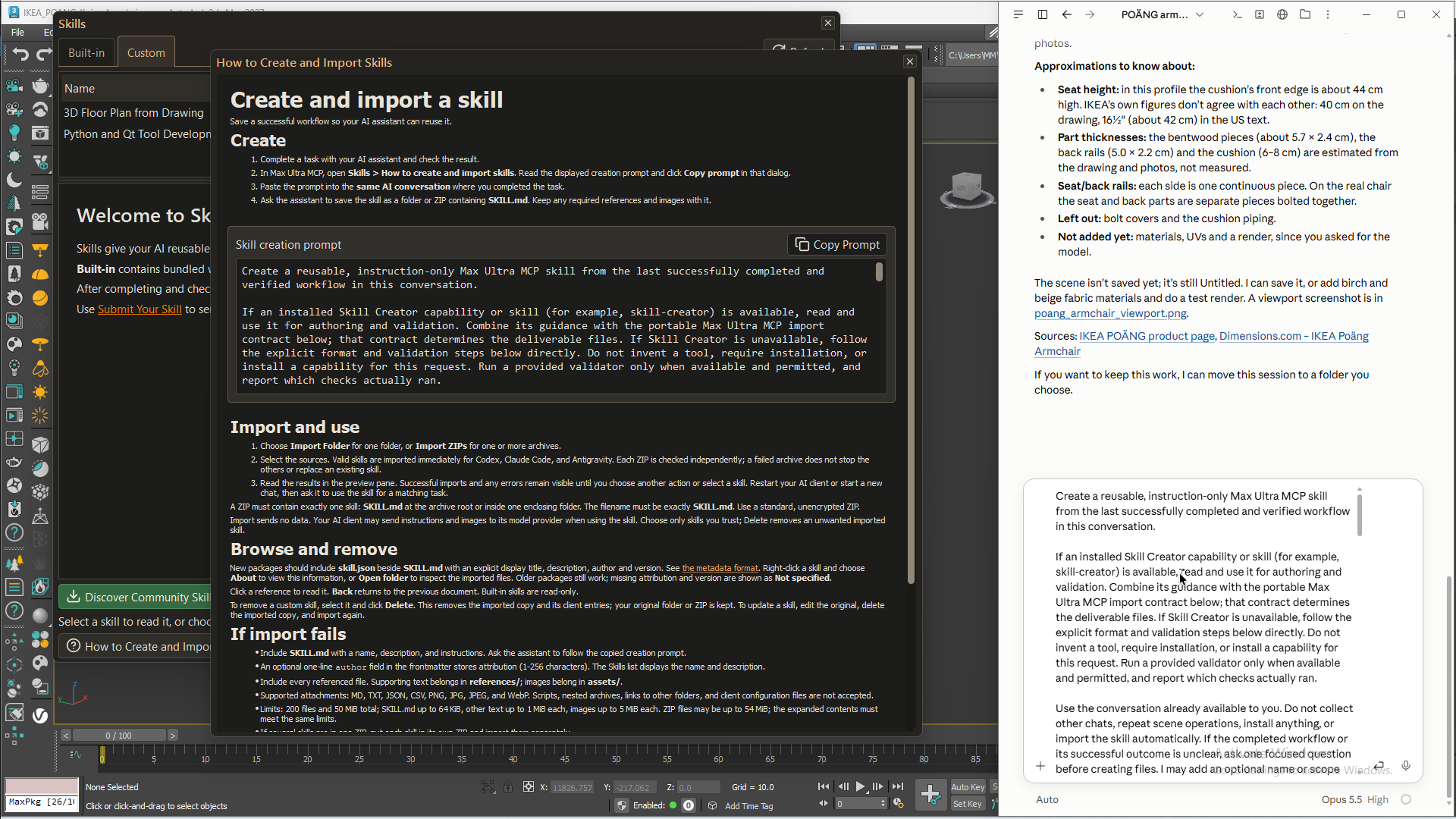
Max Ultra MCP provides a dedicated skill creation prompt for this. Copy it from the script and send it to the same chat where you worked on the task and made revisions. That gives the agent the context it needs to prepare instructions for similar tasks in the future.
- Bring the task to a result you're happy with and check it in 3ds Max.
- Open the Skills section in Max Ultra MCP and copy the dedicated prompt for creating your own skill.
- Paste it into the same agent chat containing the task, discussion, and corrections.
- Review the prepared skill and connect it through the Skills manager.
When reviewing it, check whether the agent saved useful rules rather than simply retelling the conversation. For example, checking the silhouette before adding detail will help with the next armchair too. An object name from the current scene or an arbitrary file path usually won't. It's useful to keep failed attempts as mistakes to avoid.
I like that you don't need to invent the perfect instruction in advance. First, you solve your task, explain what you're unhappy with along the way, and then save the method you found. For similar tasks later, that skill will help you avoid repeating the same explanations from scratch.
You can connect your own skills through the manager. There are also Community Skills with additional workflows from the community; in the current interface, the catalog opens through Discover Community Skills. Manager and catalog documentation.
A skill doesn't retrain the model, though. It helps it follow a more suitable process, but doesn't guarantee accurate proportions or good geometry. Even with detailed instructions, the agent sometimes does things differently from what you expected.
Which AI agents you can use
Max Ultra MCP isn't tied to a single AI model. Its setup includes Codex, Claude Code, and Google Antigravity. You can connect other compatible MCP clients too, provided they support the required local connection. Client setup in the project documentation.
I'd choose an agent based on my tasks. Renaming objects doesn't always need deep reasoning from the most powerful model. But for developing a complex script or analyzing references, a stronger model may be more useful. An overly weak option can be inefficient too: quick answers don't help much if you constantly have to fix mistakes.
For a complex task, I first ask for a plan. Sometimes it's easier to explain an idea by voice and ask for it to be turned into a precise brief, if the client supports that kind of input. This helps clarify the requirements, though it doesn't guarantee token savings on its own.
If you'd like to see how the models work differently, Arch Viz Artist has a comparison of GPT-6 Astra and Claude Opus 5.5 through Max Ultra MCP. It tests architectural visualization tasks: modeling from CAD, applying client revisions, and creating furniture. Reviews like these are useful when choosing an agent for your work.
Subscriptions, limits, and actual costs
Max Ultra MCP itself is free. I develop it in my spare time, and you can support development through the donation links in the script. What you pay for AI depends on the service and how you sign in.
Codex supports signing in with a ChatGPT account and a separate API key option. API billing is separate from subscription usage. OpenAI's authentication documentation. Claude Code can also work through an eligible subscription, but an API key and environment settings can change how usage is billed. Claude Code terms for Pro and Max.
For initial experiments, I considered subscriptions around $20 a month; for intensive work, higher-capacity plans starting at $100. As of October 19, 2026, OpenAI lists ChatGPT Plus at $20 and Pro starting at $100 per month. These are reference prices for a particular service, not a mandatory entry cost for Max Ultra MCP. Check the available models and terms before paying. Current plans and pricing.
In my experience, active testing can burn through a small usage allowance quickly. Sometimes I had to take a break after about an hour. But there's no universal rule: usage depends on the model, conversation length, screenshots, and number of attempts. Claude, for example, has five-hour and weekly limits, so not every exhausted allowance resets after five hours.
If you want to stay within your subscription, check additional credits, API billing, and automatic top-ups. Options for continuing at an extra charge are described in the Codex terms and Claude's additional credit rules. The MCP bridge itself doesn't manage model spending. I'd test a few of my own tasks first and only then decide whether I need a more expensive plan.
My experiment: ChatGPT vs. Claude Code
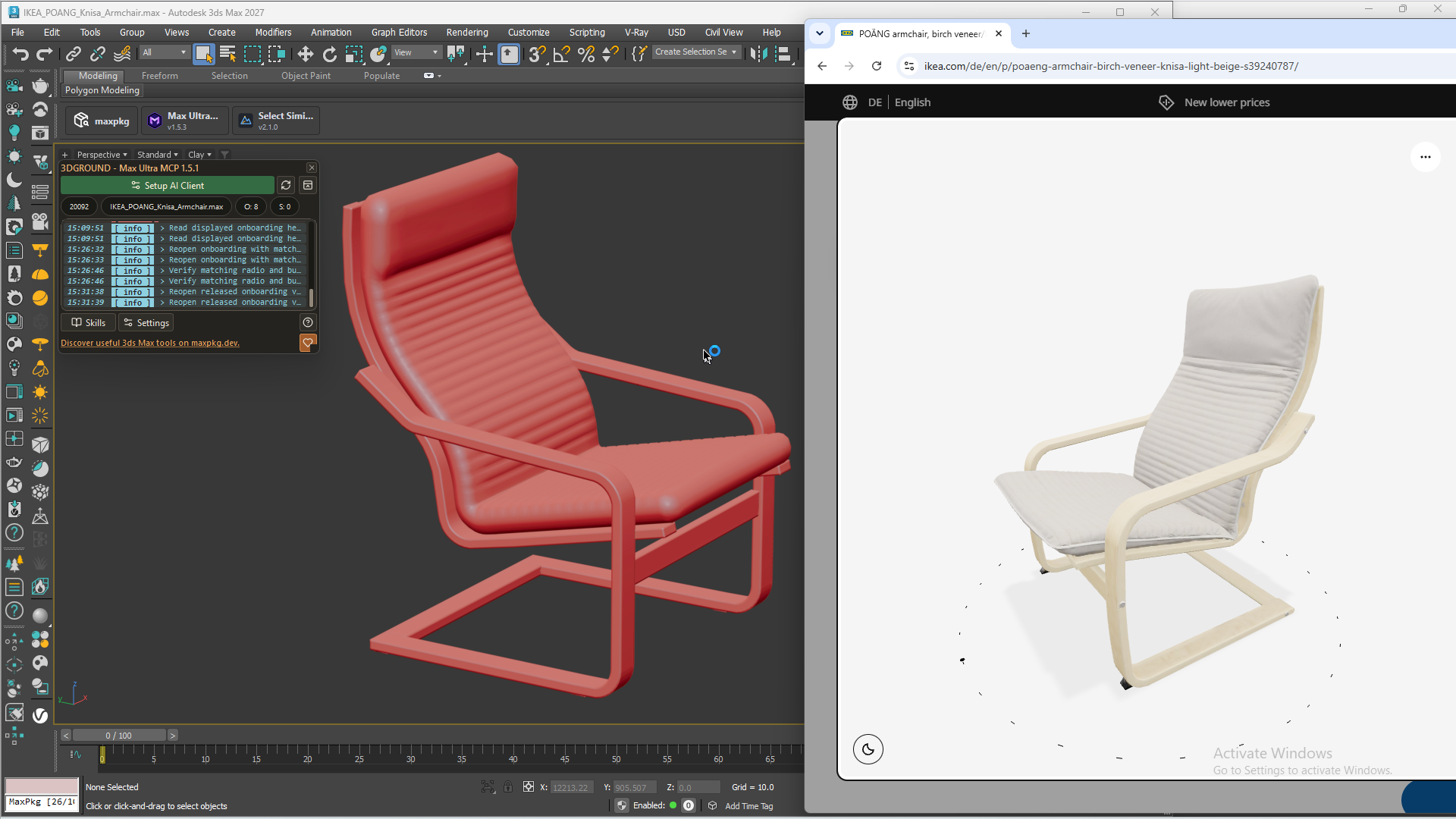
To test modeling in practice, I chose the IKEA POÄNG armchair. Claude Code with Opus 5.5 High and ChatGPT Codex with Astra 6 Ultra received almost the same task: study the product at the link and create a model through Max Ultra MCP. I also asked ChatGPT to look for references. The details are in a separate article about the experiment.
Claude gathered references, used an armchair skill, and spent about 30 minutes. The mesh was clean and suitable for TurboSmooth. But the shape differed noticeably from the original, and fasteners and seams were missing.
ChatGPT finished in about ten minutes and added more detail. However, there were geometry intersections, smoothing issues, and overly sharp cushion corners. I had to use Ultra to get an acceptable result: lower settings produced more artifacts.

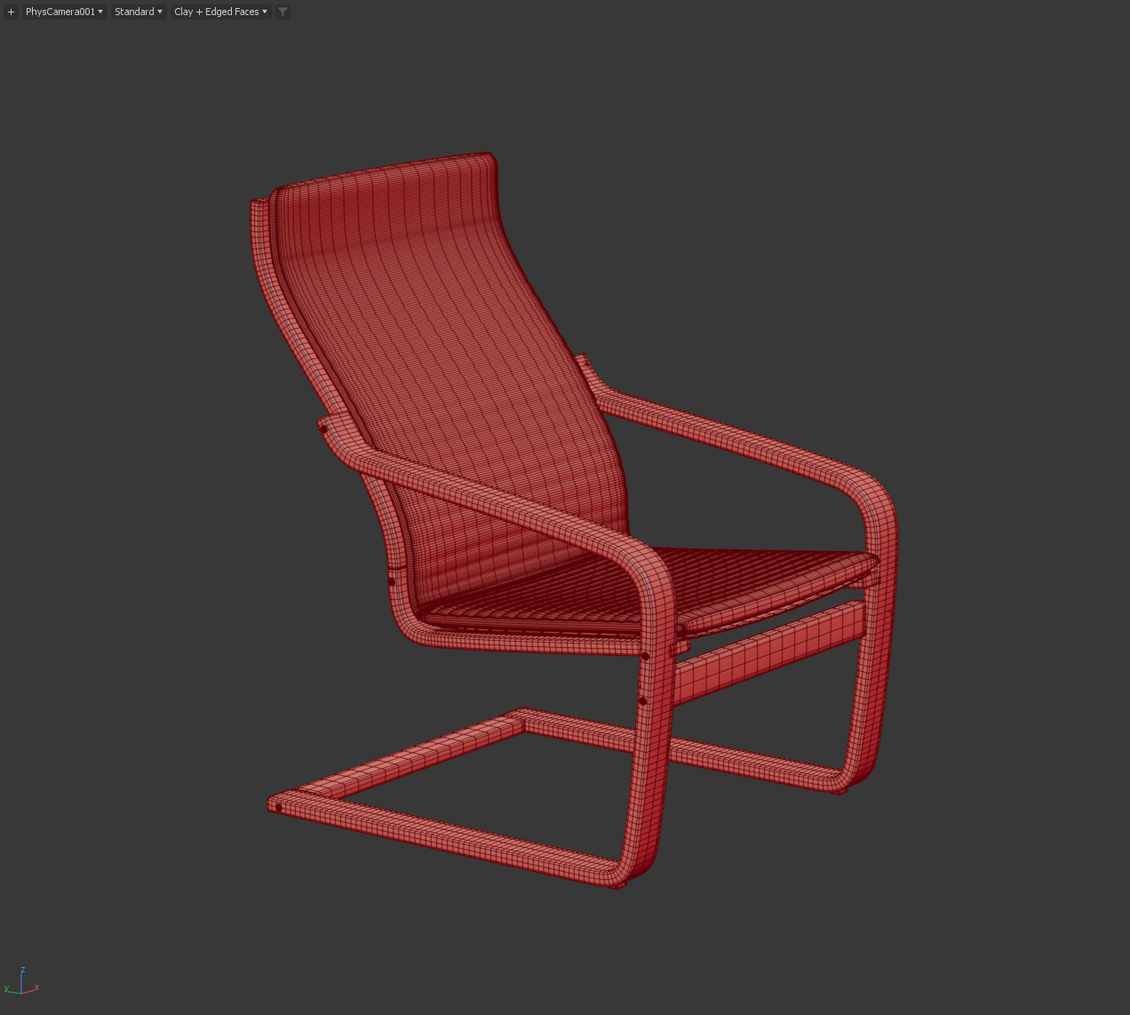
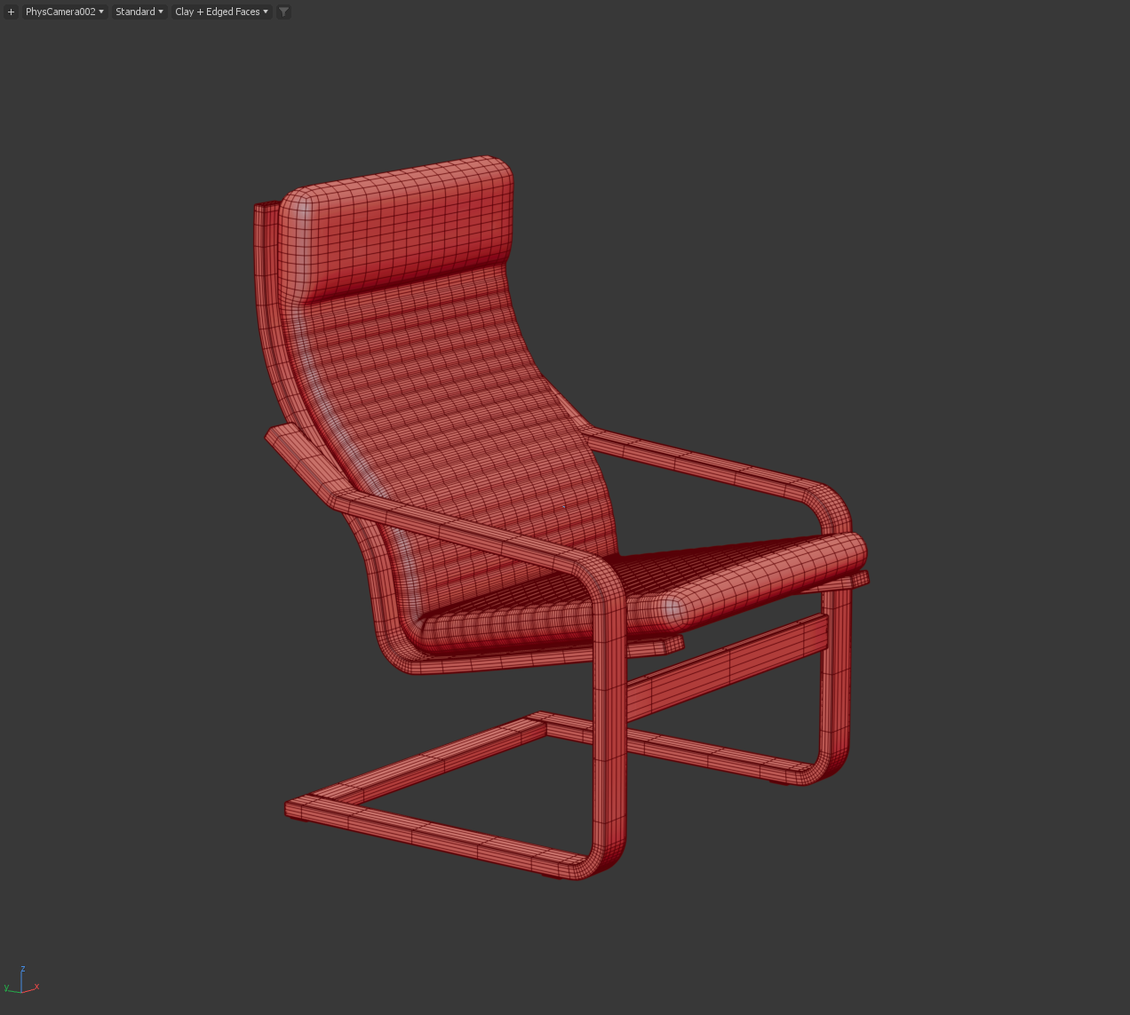
The main point for me: neither agent reproduced the POÄNG accurately enough. One had the better mesh, the other had speed and detail, but this particular armchair still needed refinement. This is the result of one experiment, not a model ranking for every possible use.
What problems remain
Complex modeling is still unpredictable. An agent can know the commands, build a mesh, and still misunderstand the shape. This is especially noticeable in curves, joints, and proportions. A few clarifications help, but sometimes a practical question comes up: how much time will the explanations take, and would it be faster to fix the object myself?
The result depends on both the model and how you frame the task. One agent spends a long time studying references; another starts building sooner. I look at the entire path to the result: how many attempts, how much of my involvement, and how many manual fixes it took. The speed of a single reply doesn't tell you much.
Don't expect the work to always finish in a minute. The agent needs to read the scene, run commands, and check the result. In a heavy project, the limitations of 3ds Max itself, the renderer, and the computer also come into play.
Before major changes, I save a copy of the scene. An agent can misunderstand a request, choose a poor approach, or run code that changes more than it should. So for bulk operations, it's useful to get a plan first, and for a new script, to use a test scene.
You can also work with several open 3ds Max sessions, including multiple instances of the same version. I specify the right PID, meaning process ID, and assign a particular scene to the chat. It's convenient: the agent works in one session, and I work in another. But they share the computer's resources, and some interface actions may need the window to have focus. I prefer not to edit the same objects at the same time as the agent.
How to install Max Ultra MCP and get started
The current description lists support for Windows and 3ds Max 2022–2027. I wanted to avoid having to build a separate native plugin for each Max version. The tool does use ready-made runtimes, though: Node.js is included in the package, and Python comes from 3ds Max. The stated range doesn't mean every combination of renderer and third-party plugins has been tested. Requirements and download.
- Open the Max Ultra MCP page, click Install, and drag the package block into the viewport. If dragging doesn't work, use the provided installer or install the MZP manually through Scripting → Run Script.
- Launch Max Ultra MCP and open AI Client Setup.
- Choose Codex, Claude Code, or Antigravity. If required components are missing, follow the steps offered by the setup.
- Refresh the status and connect the client. Installing the application and registering the MCP connection may be separate actions.
- If necessary, restart or reconnect the AI client and open a new chat.
- Copy the Test prompt from the interface and check the connection.
- After a successful check, send your first command in a small test scene.
In the workflow described in the project documentation, ChatGPT Desktop uses Codex mode, while Claude uses a local Code session. An ordinary chat doesn't automatically mean access to local 3ds Max. The MCP Ready status should also be confirmed with a request from the current chat. Connection instructions.
Check the connection to 3ds Max. Show the available sessions, their versions, PIDs, and the names of open scenes. Don't change anything yet.
After choosing the right session, you can try a simple action:
Create a 100 × 100 × 100 cm cube named MCP_Test_Box in the current test scene. Place it on the Z = 0 plane, select it, frame it fully in the viewport, and check its dimensions. Don't change any other objects.
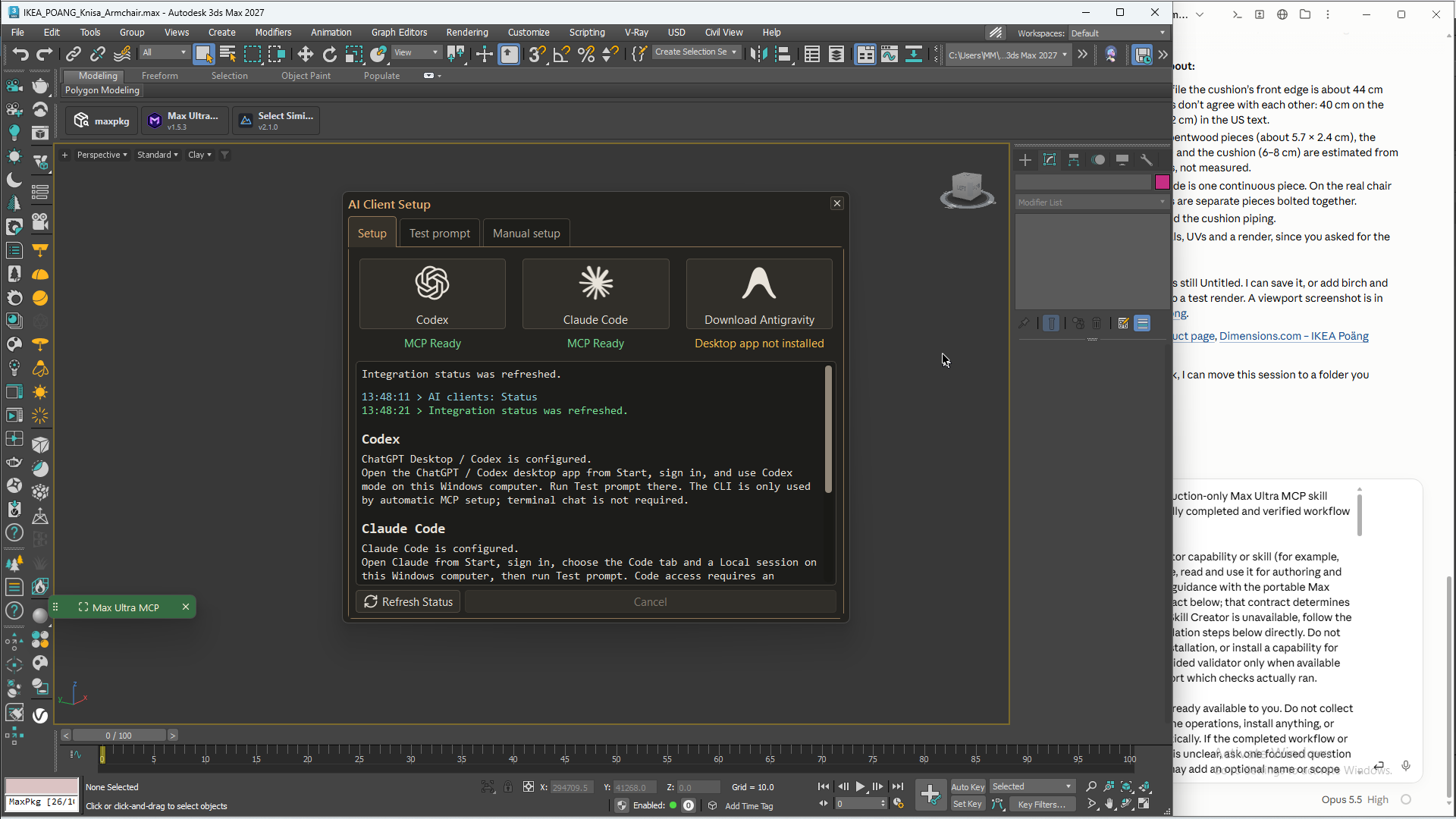
In normal use, I don't need to restart 3ds Max every time I open the tool. But Hide panel and closing the main window behave differently: hiding preserves the connection, while closing stops the script. After a stop or failure, you may need to reconnect. Panel behavior.
Where I want to take this idea
I'm interested in turning an artist's working experience into tools. Someone knows how cameras should be named, how a scene is organized, and what checks are needed before delivery. As long as those rules live only in their head, they keep carrying them out manually.
With AI, you can try turning that experience into a script or skill. Solve one task first, check the result, fix the weak points, and save the process that worked. Next time, you don't have to start with an empty chat.
In modeling, I'd like to achieve more careful reference work: checking the silhouette before adding detail, comparing individual parts, and not declaring the task finished as soon as a roughly similar shape appears. The armchair experiment showed clearly why this matters.
Will agents be able to create complex scenes on their own? I wouldn't put a date on it yet. I find it more useful to look at the specific actions I can already give them and where my instructions actually improve the result.
AI still needs an artist
Max Ultra MCP doesn't turn a model into an experienced 3D artist. It makes mistakes, doesn't always interpret references accurately, and needs supervision. But now it can take action in the program itself and get feedback from the result.
I started with a fairly down-to-earth wish: to stop manually running and checking every script change. Now the same approach can organize a scene, prepare cameras, build basic room geometry, or create a custom tool for a specific task.
For a first try, I'd choose one repetitive operation from my own work. That makes it easier to see whether the agent saves time and what you need to explain. And if you give it a go, tell me what you managed to automate and where things went off track. Those are the examples I'm most interested in.
FAQ
1. What is Max Ultra MCP?
2. Is Max Ultra MCP free?
3. Which 3ds Max versions and AI clients does it support?
4. Can I create scripts without knowing MaxScript?
5. Can AI accurately model furniture from a photo?
Latest articles


{{comment.text}}