

ChatGPT vs Claude Code: AI 3D Modeling in 3ds Max



Can you simply show an AI a picture of an armchair and ask it to create a complete 3D model? Not just some rough shape, but a proper model with clean geometry, good topology, and all the details?
Sounds tempting, right? Especially when you think about how much time it sometimes takes to model even relatively simple objects.
I decided to test this myself and set up a small challenge between two AI agents: Claude Code with Opus 5.5 High and ChatGPT Codex with Astra 6 Ultra.
The task was pretty simple. I picked an IKEA armchair, gave both agents a link to the product page, and asked them to recreate it in 3ds Max. No ready-made 3D models, detailed instructions, or manual modeling.
And you know what? The results were pretty interesting. Just not quite what I expected.
How Can AI Actually Work in 3ds Max?
First, let me quickly explain how this works for anyone who hasn't heard of Max Ultra MCP yet.
Imagine opening Claude Code or ChatGPT and simply typing: "Create an armchair," "Organize objects into layers," or "Find all objects without materials."
And instead of just explaining how to do it, the agent actually performs the task directly inside your 3ds Max.
That's exactly why I developed Max Ultra MCP.

Basically, it's a bridge between an AI agent and 3ds Max. It allows the agent to create and modify objects, run scripts, manage scenes, and even see the application interface through screenshots.
So the agent isn't working blindly. It can see what it has created, identify problems, and try to fix them.
Max Ultra MCP itself is free and pretty easy to install.
Download Max Ultra MCP:
Why Did I Decide to Test AI Modeling?
It all started with a pretty simple thought.
Every now and then, I have tasks I'd love to automate. For example, creating a 3D floor plan, properly naming hundreds of objects, organizing layers, or performing repetitive operations.
AI agents are already pretty good at handling these kinds of tasks.
In one of my previous experiments, I tried creating a 3D house floor plan from an image. And honestly, different agents managed to handle that task reasonably well.
But creating a floor plan and modeling a specific object from reference images are two completely different things.
It's one thing to place walls and windows. It's another to recreate an armchair with specific curves, thicknesses, soft cushions, fittings, and seams.
And the important thing is that I didn't just want something that looked like an armchair. I wanted the exact model from the reference.
If AI could handle this properly, it would open up some really interesting possibilities. For example, we could quickly create furniture and other objects that aren't available in existing 3D libraries.
That's exactly what I wanted to test.
Choosing the IKEA Armchair
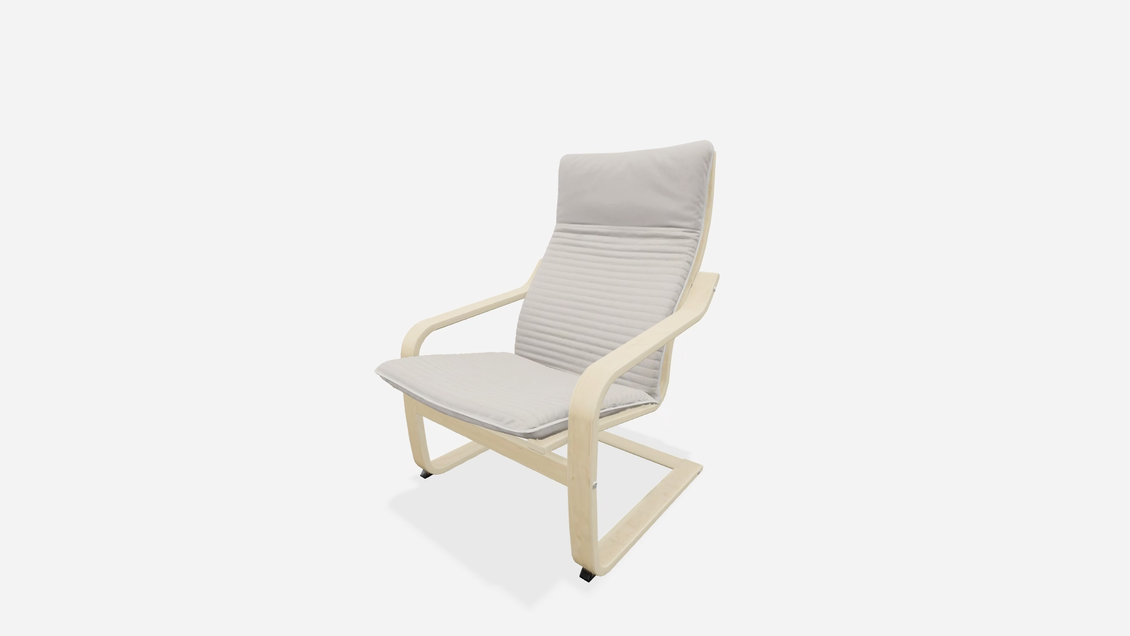
I didn't spend hours looking for some complicated model. I simply opened Google and picked the first suitable IKEA armchair of medium complexity.
I ended up choosing the POÄNG.
At first glance, there's nothing particularly special about it. A wooden frame with smooth curves, a soft cushion, and a few connecting parts.
But if you look closer, the armchair isn't quite that simple.
Its frame has a very specific shape. You need to accurately recreate the wooden curves, proportions, cushion thickness, and lots of small details.
IKEA also has an interactive 3D viewer on the product page, so you can examine the original from different angles.
Original IKEA POÄNG armchair:
For this experiment, I chose two agents:
- Claude Code: Opus 5.5 High
- ChatGPT Codex: Astra 6 Ultra
Both worked through Max Ultra MCP.
The task was almost identical: study the armchair using the provided link and create its 3D model.
Let's see what happened.
First Participant: Claude Code with Opus 5.5 High
Let's start with Claude Code.
I simply sent the agent the IKEA link and asked it to model the armchair.
And this is where things got interesting.
Instead of immediately creating geometry, Claude decided to first understand what exactly it needed to model.
It spent quite a while studying the product page, searching for additional images online, and even found some technical drawings in SVG format.
I actually liked this approach.
After all, if we want an accurate model, we first need to understand how the object is built. And having more references definitely helps.
Claude also automatically used a built-in Max Ultra MCP skill containing basic knowledge about chair modeling.
That's another good sign. Instead of randomly creating objects, the agent tried to follow additional instructions.
After gathering information, it created a plan and started modeling.
About 30 minutes later, the armchair was ready.
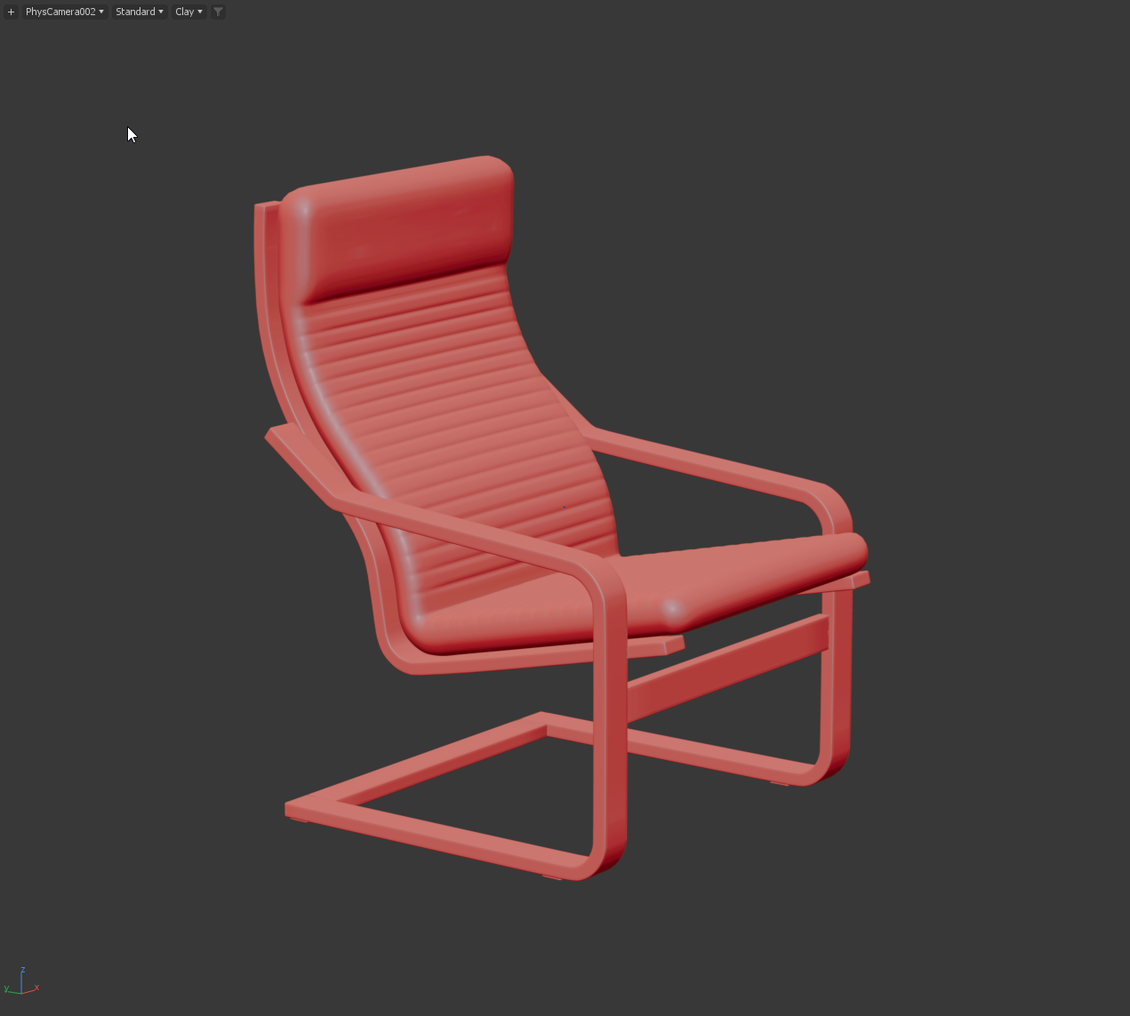
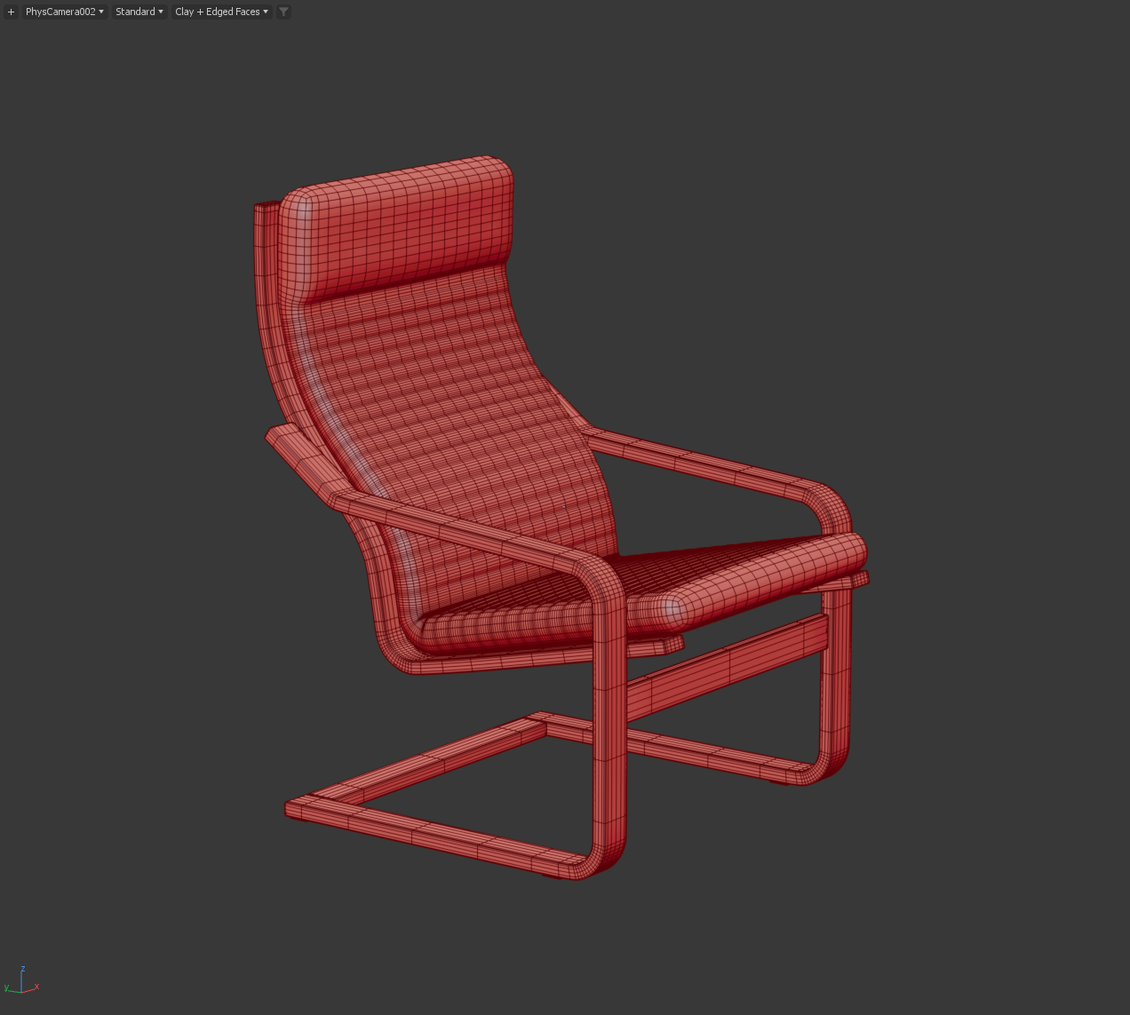
Watch Claude Code modeling the armchair:
What Did Claude Get Right?
The first thing I liked was the topology.
Claude created a really nice, fairly even mesh that works well with TurboSmooth.
And that's important.
When you're modeling furniture, simply getting a nice shape isn't enough. The geometry should also be easy to edit later.
Claude did a pretty good job here.
The model can easily be modified, reshaped, and improved. The mesh looks clean, without any major problems.
I also liked that the agent independently found additional references.
So What Went Wrong?
The biggest problem was actually pretty unexpected.
Claude created a good 3D model of an armchair, but not the armchair I showed it.
Yes, it's an armchair. Yes, it looks perfectly fine on its own. But put it next to the original IKEA POÄNG, and the differences become obvious.
The proportions and overall shape are noticeably different.
Some important details are completely missing. For example, fittings and cushion seams.
And that raises a question.
Why did the agent spend so much time searching for references if it still couldn't accurately recreate the original?
It's a pretty strange situation. Technically, the model is good, but visually, the task was only partially completed.
Another thing I didn't like was the speed.
Creating a single armchair took about 30 minutes.
For an AI agent that's supposed to save time, that's already quite a lot. Especially when you still need to manually correct the shape afterward.
Second Participant: ChatGPT Codex with Astra 6 Ultra
Now let's see what ChatGPT can do.
I gave it almost exactly the same task. The only difference was that I additionally asked it to search for references online instead of relying only on the IKEA website images.
But Astra decided to take a slightly different approach.
It didn't spend nearly as much time gathering information and mostly relied on the images already available on the product page.
On the other hand, it started working much faster.
And the result was ready about three times faster than Claude Code.
So instead of half an hour, the modeling took around ten minutes.
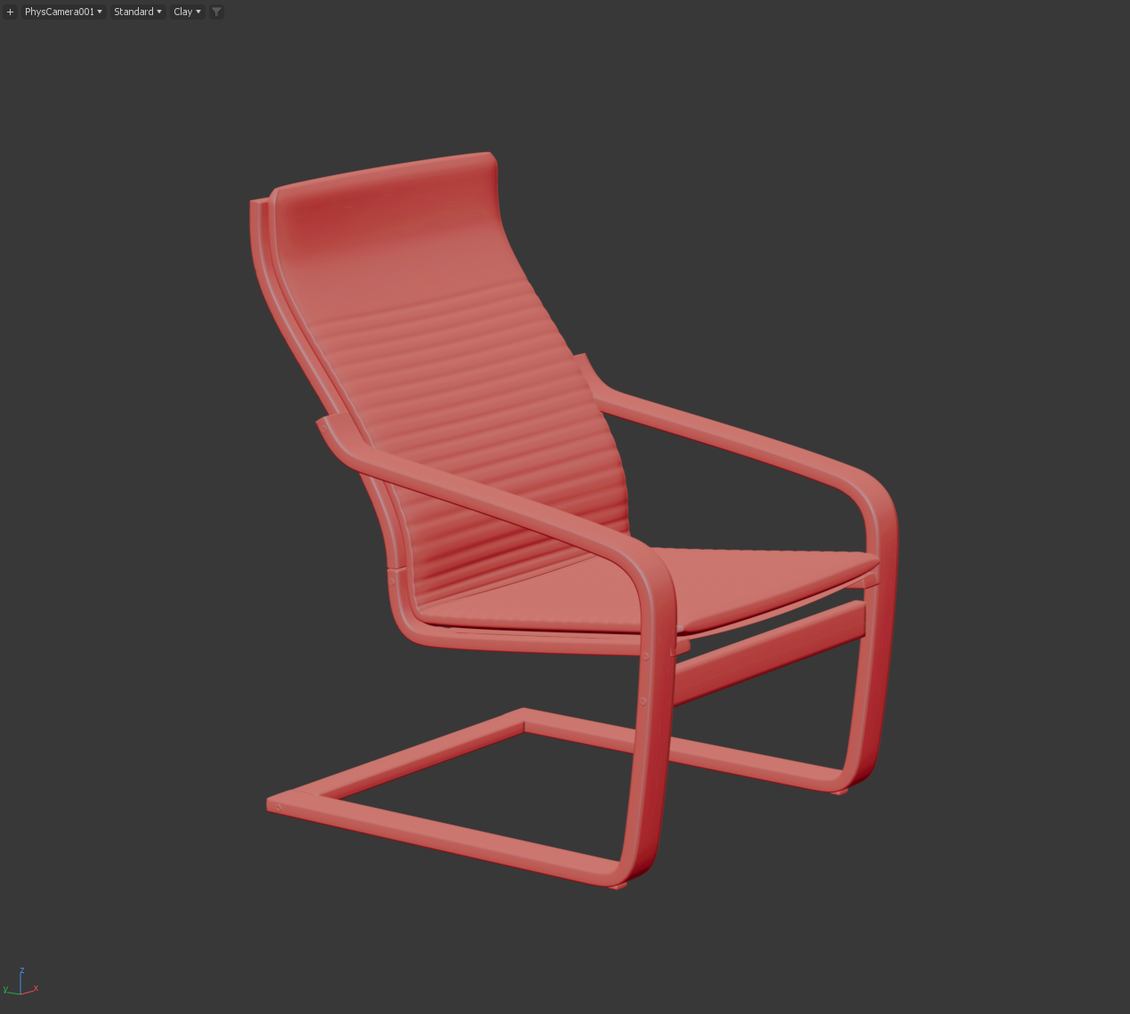
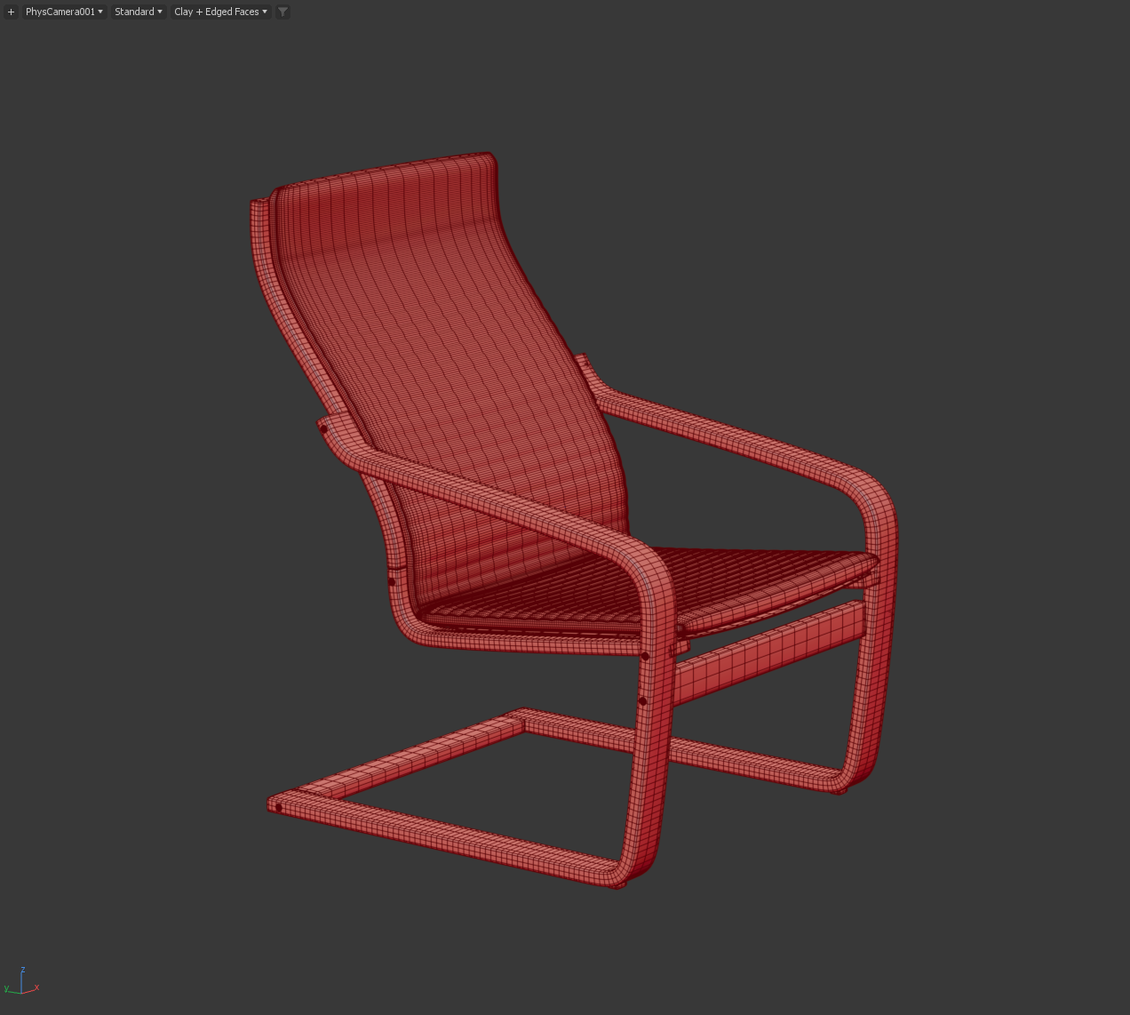
Watch ChatGPT Astra modeling the armchair:
What Did Astra Get Right?
First, the speed.
That's a pretty significant difference, especially if you want to use AI for everyday tasks.
Second, Astra paid more attention to small details.
For example, it added extra seams and fittings that Claude Code completely missed.
It also made the cushion slightly thinner, which was actually closer to the original.
Overall, the model looks recognizable.
But, as usual, there are some problems.
Problems with Geometry
While Claude Code mainly struggled with the shape, Astra also had problems with topology.
The mesh was less even.
In some places, especially around the corners, the geometry didn't work properly with TurboSmooth. Unwanted deformations appeared.
There were also areas where different parts of the geometry intersected.
That's not exactly what you want in a proper 3D model.
The cushion was another story.
Astra made its corners too sharp, and in some places, there were strange pinches that don't exist on the original armchair.
I'm not entirely sure why they were there.
And most importantly, Astra also failed to accurately recreate the original shape.
There's another important detail worth mentioning.
I had to use Ultra mode to get a decent result. Lower settings produced too many artifacts.
So yes, we got a faster result, but we shouldn't forget that a pretty powerful model configuration was used.
Comparing the Results: Who Won?
After both agents finished modeling, I placed their models next to the original and compared them carefully.
And that's when everything became much clearer.
At first glance, both models look pretty good. Especially if you look at them separately without comparing them to the real armchair.
But once you put them next to the original, the mistakes become obvious.
Claude Code created a cleaner mesh. Its model is easier to edit, and the geometry is better prepared for subdivision.
ChatGPT Astra was significantly faster and added more small details. However, it also made more topology mistakes.
When it comes to accurately matching the original shape, both agents had serious problems.
Neither agent managed to recreate the IKEA armchair closely enough.
And for me, that was the most important result of this experiment.
Because if I ask for a specific armchair, I want that exact armchair, not just something that looks similar.
Watch the detailed comparison of both models:
How Good Are AI Agents at 3D Modeling Today?
After this experiment, one comparison immediately came to mind.
Right now, AI agents model like junior 3D artists who know how to use the tools but haven't learned to pay enough attention to references.
Imagine giving a junior artist a photo of an armchair.
They quickly create the frame, add cushions, apply smoothing, and say, "Done!"
You look at the result, and everything seems to be there.
But then you open the original reference.
And suddenly you notice that the backrest curve is wrong, the cushion is too thick, the legs are at the wrong angle, and some details are completely missing.
That's pretty much what happened here.
AI agents already know how to work with geometry. They understand how to create objects, apply modifiers, and build meshes.
But they still seem to struggle with analyzing shapes and constantly comparing their results with the original.
They decide the job is finished way too early.
Even though the model still needs serious improvements.
Does This Mean AI Is Useless for 3D Modeling?
No, absolutely not.
I actually think AI can already be useful for creating 3D models.
You just need to understand where it works well.
For example, if you need a simple object, some basic geometry, or a starting point for further work, an AI agent can do a great job.
It can also help with repetitive tasks, scene organization, and various automation processes.
But when it comes to complex models that need to accurately match reference images, things get much more complicated.
Of course, you can write additional prompts.
You can point out mistakes, ask the agent to fix proportions, rebuild the mesh, or add missing details.
Maybe after several iterations, the result will become much better.
But then another question comes up.
How much time are we going to spend explaining mistakes before it becomes easier to model the object ourselves?
That's why I don't think these agents can fully replace an experienced 3D modeler yet.
Humans still understand shapes, proportions, and important details much better.
At least for now.
What If We Teach AI to Model Properly?
And here's another interesting idea.
Max Ultra MCP already has a skills system.
To put it simply, a skill is a set of additional instructions that helps an AI agent perform certain tasks better.
For example, we could create a dedicated skill for furniture modeling.
It could explain how to properly search for references, analyze proportions, build geometry, and check the results.
We could teach the agent not just to create a model, but to regularly compare it with the original.
For example, after creating the frame, it should take a screenshot, compare the shape with the reference image, and fix any mistakes.
Then it could move on to the cushions, checking their thickness, curves, and placement.
And only after that should it start working on smaller details.
We could also add specific topology rules to prevent overly sharp corners, intersecting geometry, and TurboSmooth problems.
Of course, a single skill won't magically turn AI into a professional 3D modeler.
But I think this approach could noticeably improve the results.
And the interesting thing is that we wouldn't necessarily need to change the AI model itself. Sometimes, teaching the agent a better workflow might be enough.
If you're interested in this topic, let me know in the comments.
I could try developing a dedicated skill for more accurate 3D modeling and include it in Max Ultra MCP by default.
Then we could repeat the experiment and see how much the results improve.
Final Thoughts
So, what did we learn?
Two powerful AI agents received the same task: create a 3D model of an IKEA armchair using a product page as a reference.
Both managed to create actual 3D objects.
Claude Code took longer but produced better topology.
ChatGPT Astra was significantly faster and paid more attention to details, but made more geometry mistakes.
However, neither agent managed to accurately recreate the original armchair.
And that's what I consider the biggest problem.
Creating an armchair and recreating a specific armchair from a reference are two completely different tasks.
Right now, AI is much better at the first one.
Still, I found this experiment pretty interesting. Not that long ago, the idea of asking AI to independently create an object inside 3ds Max seemed pretty unusual.
And now we're already discussing mesh quality, subdivision problems, and how accurately AI can reproduce shapes.
That's good progress.
Just don't expect an AI agent to do everything perfectly from a single prompt.
For now, it still needs a human who understands what the final result should look like and can spot mistakes along the way.
What do you think?
Would you like to see a follow-up experiment with an improved modeling skill?
And what other tasks in 3ds Max should we test with AI agents?
Maybe you have some ideas where AI could genuinely save hours of work.
Let me know in the comments. I'll try testing the most interesting suggestions in future experiments.
Latest articles


{{comment.text}}