Error Unexpected end of script

Vasyl Lukianenko
Vasyl Lukianenko
3D Artist and Technical Author

Where does this error come from?

Sometimes, when launching 3Ds Max, for some unknown reason, a "MacroScript Compile " error may occur with the text "-- Compile Error: Unexpected end-of-script - In Line: -- This check..."

This error occurs due to the fact that some plugins, such as V-Ray Renderer or Corona Renderer, can write their scripts to certain system folders of 3Ds Max and when trying to write such a write fails. Therefore, scripts may not be generated or may be partially recorded.

An example of such a script with an error, you can see in the screenshot below:
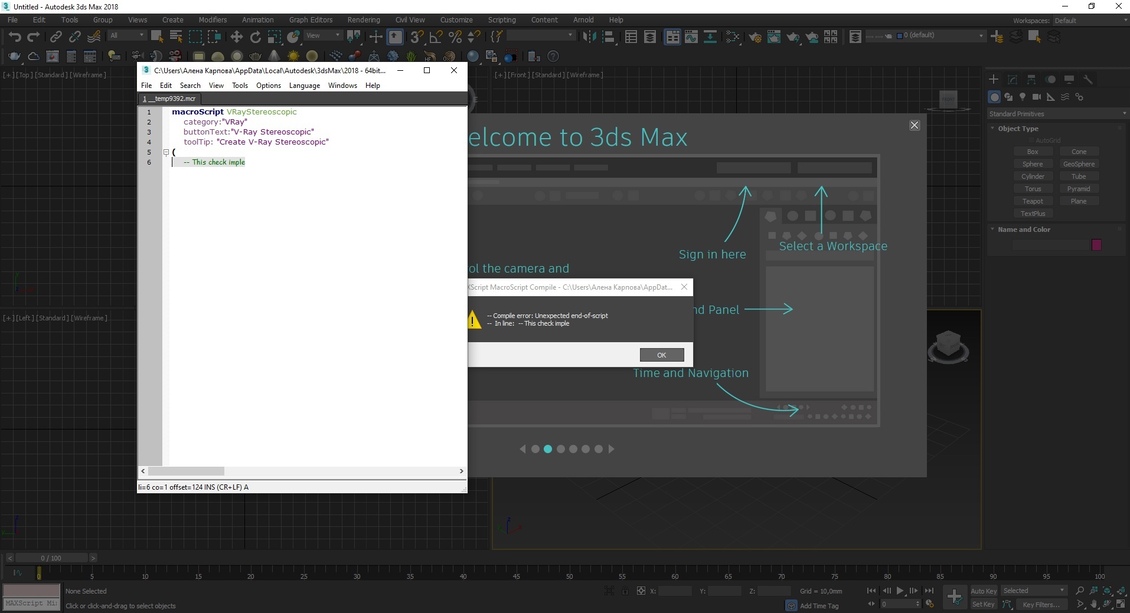
3dsmax broken script
Loading...

Solution

Press the F11 button to open the Maxscript Listener (compilation error log), you will see an error related to the temporary script __temp***.mcr.

You need to copy this path and paste in the file manager, then just find and delete the buggy file.
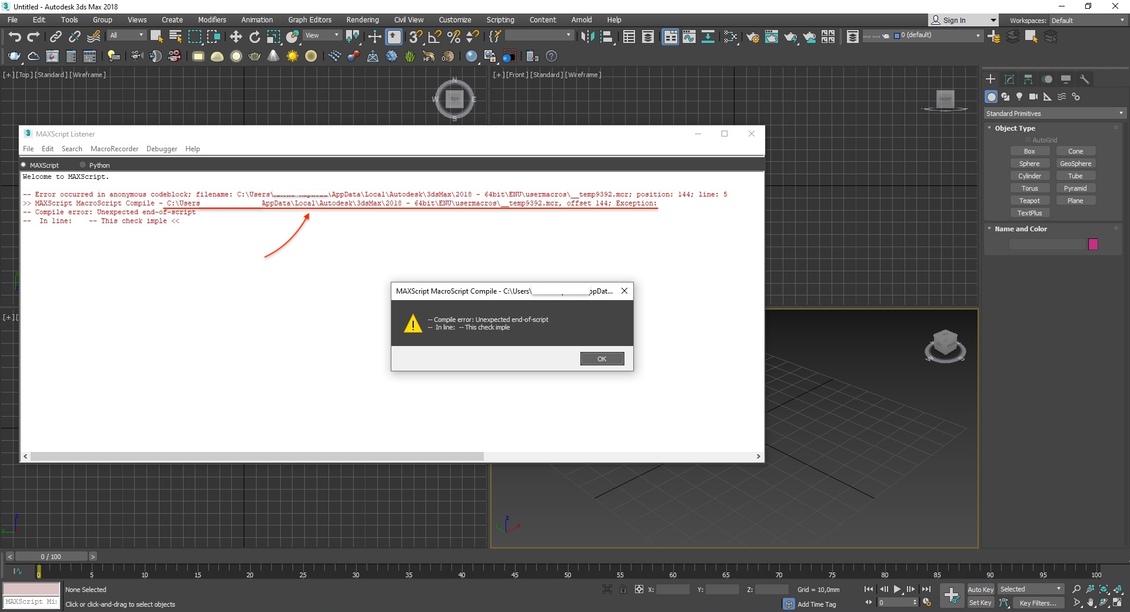
show log error end of script
Loading...
Attention!
Do not try to delete the whole ENU folder, as they say in many forums! This can lead to the loss of many settings and interrupt your workflow! Only one file that is causing the problem needs to be deleted!

Done! Try restarting 3Ds Max, there should be no error now!

FAQ

1. What is this article about?
This article discusses the "Unexpected End of Script" error in 3ds Max, including its common causes and possible solutions.
2. What does the "Unexpected End of Script" error mean?
The error indicates that the MaxScript interpreter reached the end of a script unexpectedly or encountered an incomplete or invalid script structure.
3. When does this error typically occur?
It most commonly appears when running a damaged, incomplete, corrupted, or incorrectly edited MaxScript file.
4. Can this error be caused by a virus?
Yes. Some malicious scripts for 3ds Max can modify existing scripts or inject invalid code, leading to script-related errors.
5. Can the error appear after installing a plugin?
Yes. An improperly installed, corrupted, or incompatible plugin may trigger script errors during the startup of 3ds Max.
6. What should I do when this error appears?
You should identify the script causing the issue, inspect its contents, and temporarily disable any recently installed plugins or scripts.
7. Can a damaged script file cause this error?
Yes. If a script was only partially downloaded, corrupted, or accidentally modified, it may fail to execute correctly.
8. Does the 3ds Max version matter?
Yes. Some scripts are designed for specific versions of 3ds Max and may not work correctly in older or newer releases.
9. Can I locate the problematic script myself?
Yes. The error message often contains the file path or line number where the issue occurred, making troubleshooting easier.
10. Can reinstalling the script fix the problem?
In many cases, reinstalling the original version of the script resolves the error.
11. Can manual code editing cause this error?
Yes. Missing brackets, quotation marks, keywords, or other syntax elements can trigger this type of error.
12. Should I check the 3ds Max startup folders?
Yes. Many problematic or malicious scripts are automatically loaded through Startup Scripts and other initialization folders.
13. Can antivirus software help identify the issue?
If the error is related to malware, a full antivirus scan may help detect and remove infected files.
14. Is it safer to use scripts from trusted sources only?
Yes. Downloading scripts from reputable developers and official websites significantly reduces security and compatibility risks.
15. Can backups help solve the problem?
Yes. If the issue started after installing new software or modifying scripts, restoring a previous working version may quickly resolve it.
16. Who is this article useful for?
This article is useful for 3ds Max users, MaxScript developers, technical artists, IT specialists, and anyone troubleshooting script-related errors in 3ds Max.
Vasyl Lukianenko
Vasyl Lukianenko
3D Artist and Technical Author
Vasyl Lukianenko is a 3D artist and technical author focused on practical workflows, optimization, and production-ready techniques. He publishes tutorials, courses, and tools to help artists work faster and get cleaner results.
{{commentsMsg}}
  

No one has posted a comment yet
{{comment.lastname}} {{comment.name}} {{comment.date}}
{{comment.text}}
Sponsored content