

⚠️⚠️⚠️ATTENTION❗❗❗ The new virus in the cracked version of Project Manager (3Ds Max)



Project Manager by K-Studio is a great plugin for organizing your local library. But have you ever thought that by downloading the free version from Torrent or Chinese sites, you can become a victim of cybercriminals?
Locker is a typical ransomware virus that encrypts files and paralyzes your work.
Hackers from China have bypassed the license protection, added the Locker virus and are distributing the free version of Project Manager on various resources on the network.
By installing such a modified plugin, all recently opened 3Ds Max scenes and models (* .max) will be encrypted and you will not be able to open
them via File → Open, File → Merge or by double click. You can open files only through the fake Project Manager, for which you have to pay!
Chronology
On September 8, 2021, there were complaints from several users about problematic 3Ds Max files that cannot be opened.
Later it turned out that the files are encrypted and can only be opened through the Project Manager downloaded from one Chinese resource.
Analysis of the encrypted file showed that it contains Persistent Global variables, which indicates the possible presence of a script virus.
The size of the encrypted * .max file is several megabytes larger.
When trying to open an encrypted file using any of the standard methods, we we see the error:

The exact extent and regions that were threatened have not yet been clarified.
The malicious code was sent for study by our friends from ESET.
Therefore, the full report will only be available after analyzing the code.
At the moment, the developer of the Project Manager, Oleksandr Kramer, was notified of this incident and is actively helping in solving this problem.
Attention!
If you do not want your work to be paralyzed, do not install Project Manager from unknown sources or Torrent!
Install only licensed software from the official K-Studio website: https: / /3d-kstudio.com/
To avoid getting infected, follow the instructions below.
Protection
At the moment, there is no protection at the Antivirus or Prune Scene level.
But nevertheless, there are a number of characteristics by which you can determine or you have downloaded a malicious Project Manager installation file.
Sign 1:
The file name contains Chinese characters.
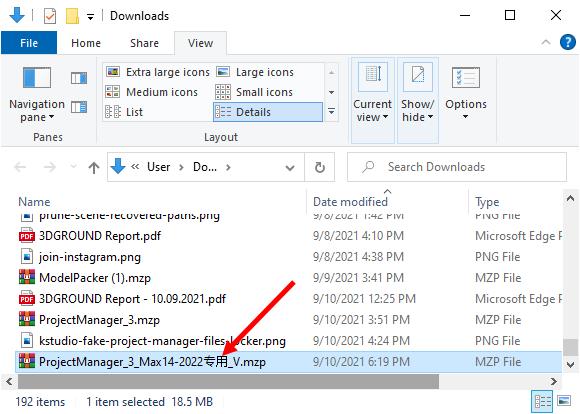
Sign 2:
If you rename the installation file and specify the file extension instead of * .mzp to * .zip, you can open it with the archiver and see the list of files.

Open this file with WinRar. If the file PM3StartRun.ms is in the list, then your version of Project Manager has been changed by hackers!
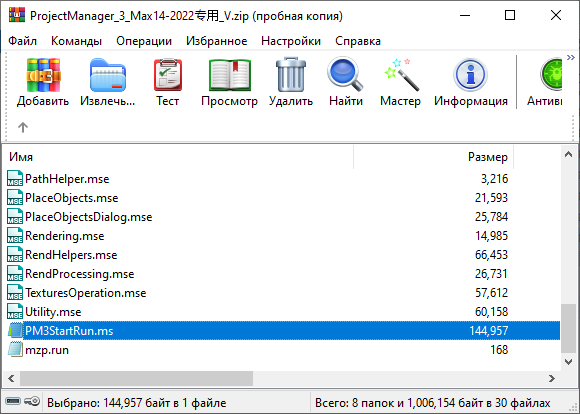
Sign 3:
If you already have Project Manager installed and you are infected, then * .max files will not be opened via File → Open.
Summary
Fake Project Manager Locker is a rather dangerous modification of the original K-Studio Project Manager plugin. Ignoring simple security rules and unwillingness to buy licensed software can lead to the loss of your data, scenes, models and stop the workflow.
Important! Download Project Manager only from the official site.
For those who have been infected, unfortunately, there is still no solution to eliminate the consequences. But we are actively working on this with ESET and the developers from K-Studio.
This article will be updated as various information becomes available. Stay tuned!
FAQ
1. What is this article about?
2. Why is this topic important for 3ds Max users?
3. Which version of Project Manager is affected?
4. Can the official Project Manager contain this virus?
5. What are the risks of using cracked software?
6. How can the virus get onto a computer?
7. What consequences can an infection have?
8. Why are 3D artists particularly vulnerable?
9. How can users reduce the risk of infection?
10. Should third-party scripts and plugins be checked before use?
11. Can malware spread through project files?
12. Why is it important to keep software updated?
13. Can antivirus software help prevent such infections?
14. What should users do if they suspect an infection?
15. Why is licensed software generally safer?
16. Who is this article useful for?
Latest articles


{{comment.text}}